





Every European country has its own VAT tax rates. I don’t want you to waste time finding and adding them to your store. Download three CSV files with the WooCommerce tax rates (EU VAT, USA, Canada, Australia, and more countries).
- About EU VAT rates and VAT in Europe.
- How to configure tax rates in WooCommerce.
- Download WooCommerce tax rates (EU, USA, Canada, Australia, and more.
- Import the WooCommerce EU VAT tax rates from the CSV file.
- Read more about taxes & invoicing in WooCommerce
EU VAT tax rates in practice
If you sell your products in the EU to individual customers, you add your origin’s VAT tax. For example, your store is in Germany and you sell to France. You add VAT tax to your products in Germany.
There is another case for digital products and services. You use your customer’s country tax then. In the previous example, you should add a VAT tax from France. From 1 July 2021, there is a new EU-wide threshold of EUR 10 000. Below that limit, you may add the VAT of the store country. Read more to be up to date with the EU requirements.
This concerns B2C transactions only.
If you sell B2B, then you should charge your customer the zero rate.
The customers calculate VAT taxes themselves (reverse charge).
In this case, the customer needs to provide its VAT EU number. Check out how to add the VAT EU number field in WooCommerce.
You may also be interested in the Flexible Invoices WooCommerce plugin. Read how to invoice in the European Union using WooCommerce and issue OSS invoices.
See how the plugin takes care of VAT EU number validation to decide about the type of client to add the right VAT tax on the invoice. Also, how the plugin can add a conversion table with rates automatically taken from the European Central Bank for invoices with the VAT for such OSS (MOSS) transactions.
Are you looking for a great plugin to invoice in WooCommerce? If so, read how to create, download, email & print an invoice in WordPress & WooCommerce. And start to invoice right away with Flexible PDF Invoices.
How to configure VAT tax rates (EU, USA, Canada, Australia, and other countries)
The process is quick and simple. In short:
- Create a new tax class.
- Download the WooCommerce EU, US, Canadian, and more VAT tax rates in the CSV file
- Set rates for the new class (by importing the file).
- Assign the class to your digital products.
I’ll guide you step by step.
Create a new tax class
Go to WooCommerce → Settings → Tax:
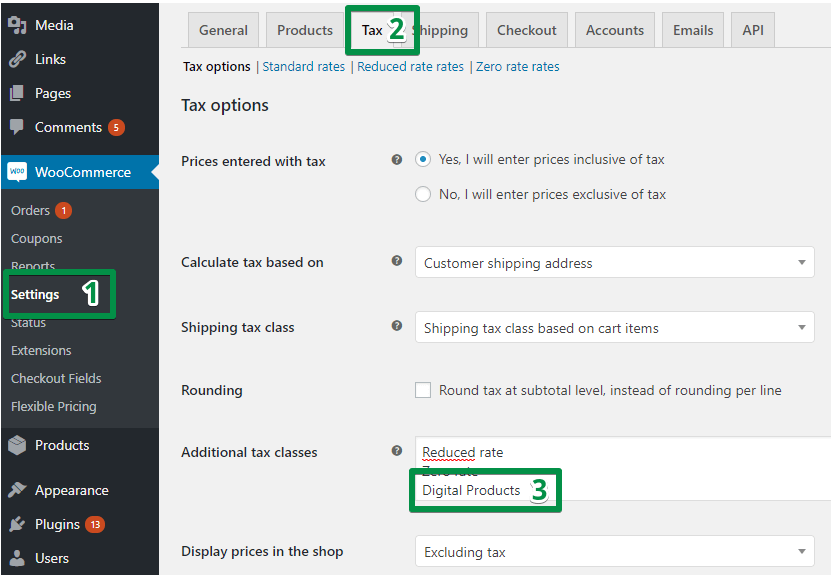
Add additional tax class. You can name it whatever you want. I named it ‘Digital Products’. A user will not see its name.
Once you save the settings, a new link shows up:

You will import the WooCommerce EU VAT tax rates from the downloaded CSV file in the next step.
Download the WooCommerce VAT tax rates (3 CSV files – for EU, USA, Canada, Australia, and more countries)
The files are very simple in their structure:
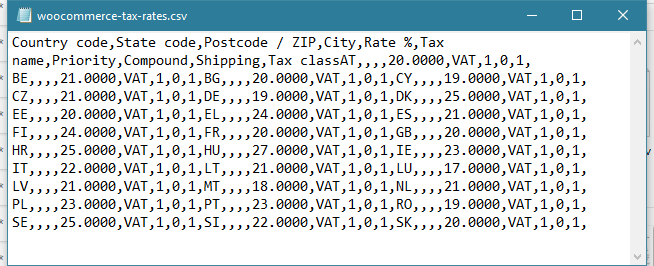
The one above contains all the EU VAT tax rates. I took them from the Your Europe website on 14th December 2020.
Sign up & download the tax rates
To download the tax rates please sign up for our newsletter. You will receive an email with 3 files with the tax rates and PDF instructions. Check if tax rates are imported properly and update the current state of the tax rates after importing if some countries change them. You will also be up to date with the newest articles about WooCommerce, taxes, and invoicing.
Import the WooCommerce EU VAT tax rates from the CSV file
Once you download the EU sales tax rates (or a CSV file with tax rates for different countries), you can import them in WooCommerce → Settings → Tax → Your Tax Rate Name:
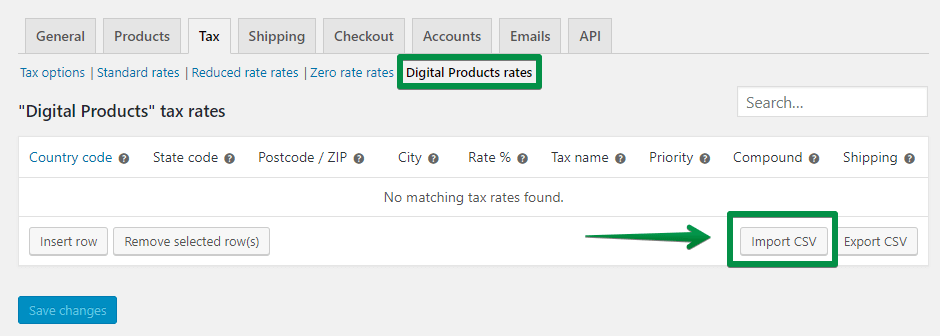
Select a file in the next step and click the “Upload file and import” button.
Assign the class to your digital products
Go to your products settings. Select your new tax class in the Tax class option:
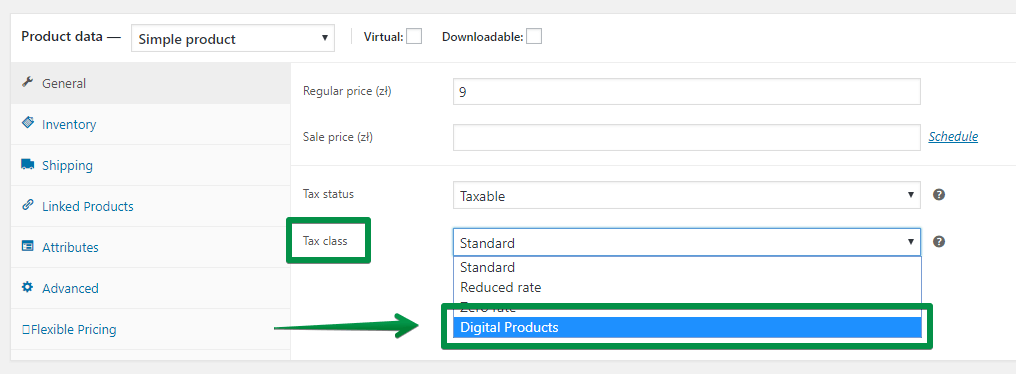
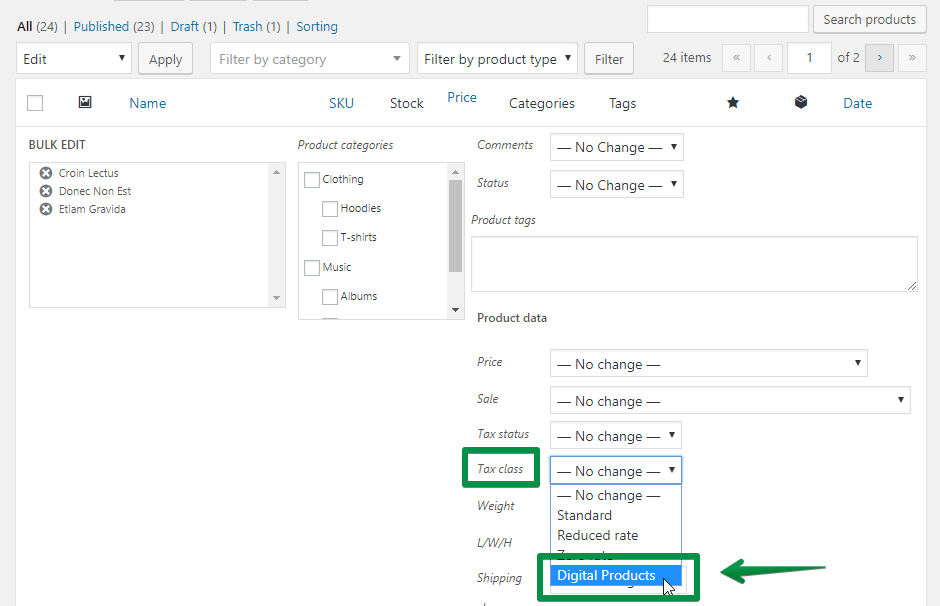
You can edit products in bulk, too:
Summary: Download and import EU VAT tax rates from a CSV file
In this article, you have learned how to set VAT tax rates (tax rates for example for the EU, Canada, USA, or Australia) in your store. And how to download and import to WooCommerce the tax rates CSV file.
Let me know if the files with WooCommerce tax rates for the EU, USA, Canada, Australia, and more countries were useful for you!
Do you need more information about taxes and invoicing in WooCommerce?
Read:
- WooCommerce Taxes Guide →
- About setting tax rates for EU invoices →
- How to set taxes for OSS →
- How to invoice in WooCommerce with a free plugin
Read also the Flexible Invoices for WooCommerce following the EU law article if you’re interested in invoicing for EU customers.
Finally, check the Flexible PDF Invoices for WooCommerce premium plugin. It allows you to issue invoices in your store with proper VAT rates, OSS support, reverse charge, and automatic EU VAT number validation!
