



Go to Invoices → Settings → Currencies to manage the currencies available when issuing invoices and configure how amounts are displayed.
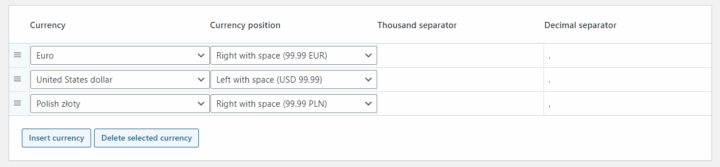
Available Currencies#
The plugin's initial currency list includes PLN, USD and EUR. When WooCommerce is active, the store currency is also added during initial configuration if it is not already on the list.
You can add more currencies by selecting them from the available currency list.
Drag and drop currency rows to change their order in the currency selector when issuing invoices. The first currency is the default selection for a new invoice created manually.
Currency Formatting#
Configure the following options separately for each currency:
- Currency — select the currency.
- Currency position — display the currency symbol before or after the amount, with or without a space.
- Thousand separator — choose the character used to separate groups of thousands, such as a comma or a space.
- Decimal separator — choose the character separating the whole and fractional parts of an amount, such as a period or a comma.
For example, USD with the symbol before the amount, a comma as the thousand separator and a period as the decimal separator is displayed as $1,234.56.
Amounts are formatted to two decimal places. The Currencies tab does not provide a setting to change the number of decimal places.
Save your changes after editing the currency list or formatting options.