



A WooCommerce store selling across the EU has to do four things its core software cannot: charge the right country’s VAT rate, collect and validate the buyer’s VAT number, drop VAT and add a reverse charge note for valid business buyers in other member states, and show a currency conversion table when the invoice is not in the store’s own currency. Flexible Invoices for WooCommerce covers all four, with rates pulled from the European Central Bank and numbers checked against VIES. Below, what each requirement actually means and where it is configured.
Invoices in WooCommerce for EU clients: in brief
Flexible Invoices for WooCommerce handles invoicing and EU VAT in the same plugin, so the VAT number field, the VIES lookup, the tax treatment and the document itself are not spread across separate extensions that have to agree with each other.
WooCommerce EU VAT compliance and features of Flexible Invoices
Here are the main functionalities you can find and use in Flexible Invoices for WooCommerce:
- OSS Handling (formerly MOSS)
- Reverse charge description on invoices
- Currency exchange table
- Exchange rates from the European Central Bank
- VAT number validation in the VIES database
- Translations and WPML Support
- Frequently asked questions
Accounting in the EU
The central question in any cross-border sale is which country’s VAT applies, and the answer depends on who is buying and what you are selling. That single decision then drives everything printed on the document: the rate, the amounts, and the annotations that have to appear when no VAT is charged.
| Buyer | VAT applied | On the invoice |
|---|---|---|
| Consumer, same country | Your rate | Standard |
| Consumer, another EU country | Your rate below the threshold, theirs above it | Standard |
| Company, same country | Your rate | Standard |
| Company, another EU country, valid VAT number | None | Reverse charge note, both VAT numbers |
A store that gets the last row wrong issues documents its customer’s accountant will reject. A store that gets the third row wrong, by zero-rating a domestic business buyer, has simply not charged VAT it owes.
OSS handling (formerly MOSS)
Since 2015, VAT on digital goods and other telecommunications, broadcasting and electronic services has been charged in the country where the consumer lives, rather than where the seller is established.
The EUR 10,000 threshold
That rule has had a floor under it since 1 July 2021. Below EUR 10,000 of cross-border sales to EU consumers per year, you may keep charging your own country’s rate. Above it, you charge each customer’s national rate and report through the One Stop Shop.
Two details catch stores out. The threshold is a single, EU-wide figure, not EUR 10,000 per country. And since July 2021 it covers goods and digital services together, so a store selling both adds them up rather than treating them as separate allowances.
Confirming the customer’s country
Sometimes the address a customer types does not match the country their IP address suggests, and for digital services that discrepancy matters, because the location determines the rate. The plugin can ask the customer to confirm their country at checkout.
This exists because of an evidence rule rather than a technical one. For telecommunications, broadcasting and electronic services, the seller is generally expected to hold two non-contradictory pieces of evidence of where the customer belongs, such as the billing address and the IP address. A simplification lets smaller sellers rely on a single piece below EUR 100,000 of such cross-border supplies. Your accountant can confirm which applies to you, but either way the confirmation step is what turns a guess into a record.
WooCommerce tax rates and the current OSS mechanism
The plugin will issue invoices with the appropriate VAT rate based on the customer’s country, but it applies rates rather than inventing them, so the rate table in WooCommerce has to be filled in first. See the How to configure WooCommerce Taxes Complete Tutorial.
Where the buyer is the one obliged to settle the tax, the invoice shows neither a tax amount nor a rate. The document then has to say why, and the annotation for that is reverse charge. An invoice with a blank VAT column and no explanation is incomplete.
Invoicing in WooCommerce for businesses and customers from the EU: example invoices
The plugin creates the invoice according to the type of customer, with no manual sorting of orders.
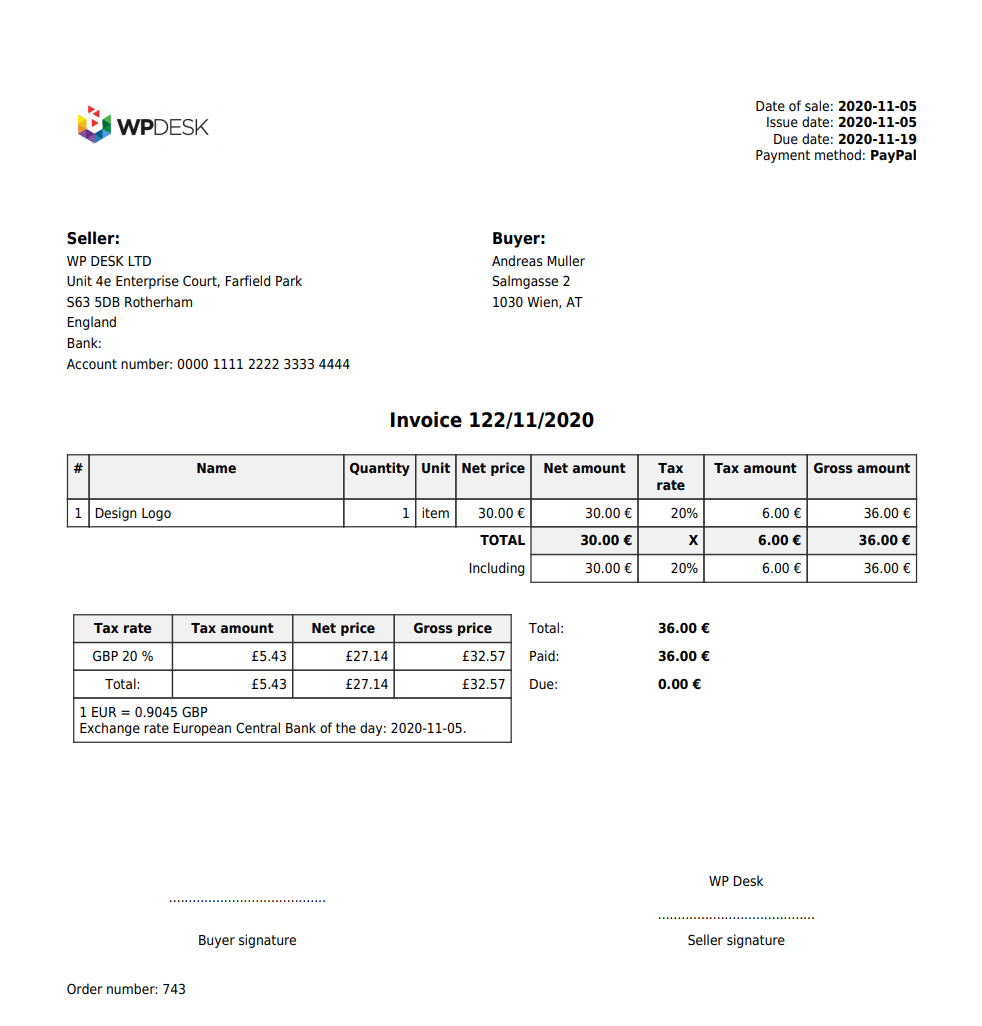
When the EU VAT number is valid, the WooCommerce invoice will get the VAT exemption:
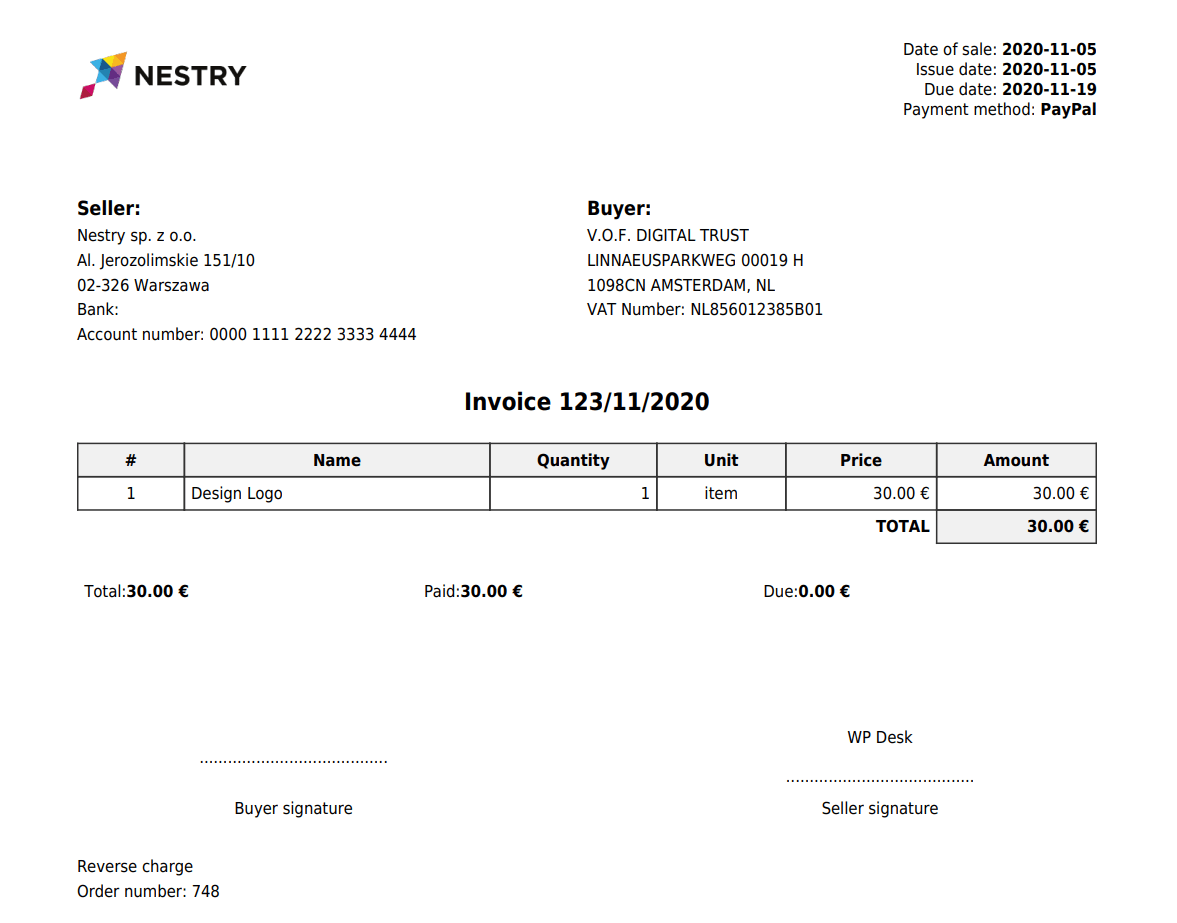
Reverse charge description on invoices
A sale to a business customer in another EU country is settled by the buyer, so the invoice carries their VAT number alongside yours and no VAT on the line items.
Note the scope: another EU country. A company buying from you in your own country pays VAT exactly as a consumer does. Reverse charge is a cross-border rule, not a business-customer rule, and treating every company order as exempt is the expensive version of this mistake.
WooCommerce on its own has no way of knowing when the exemption applies. The plugin decides it from the validated VAT number and the billing country:
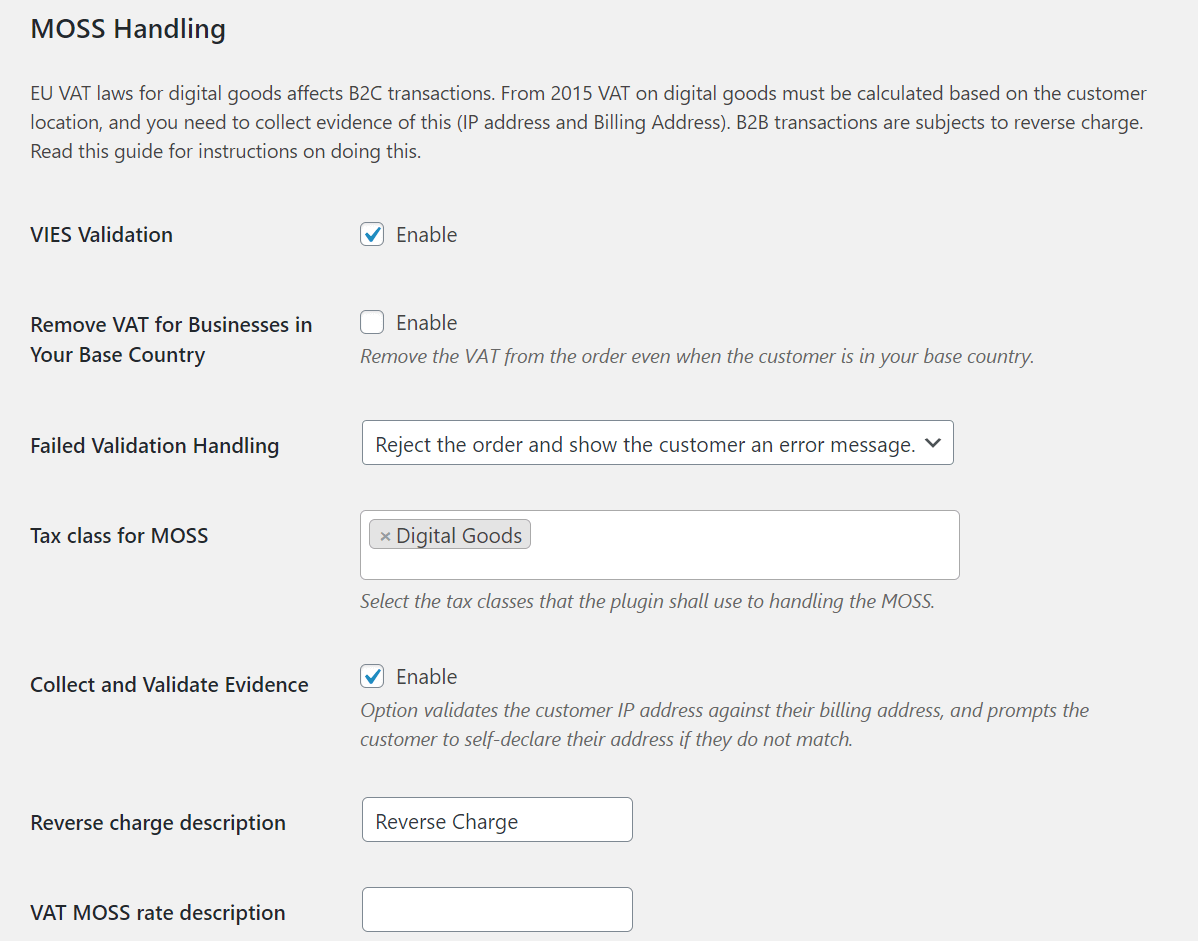
See instructions for all settings of the Flexible Invoices for WooCommerce plugin.
Conversion of VAT into local currency
An invoice issued in a currency other than your store’s default, with VAT specified, generally has to show that VAT converted into your own currency. The plugin adds a conversion table to the document covering the rate, net amounts, VAT amount and gross amount.
Exchange rates from the European Central Bank
The rate is taken from the European Central Bank for the day preceding the sale, which is the convention most EU tax authorities expect, and it is applied without anyone having to look it up.
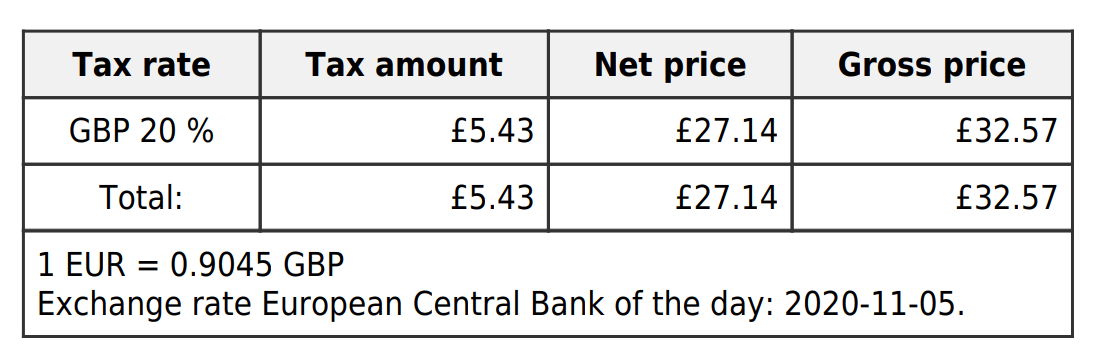
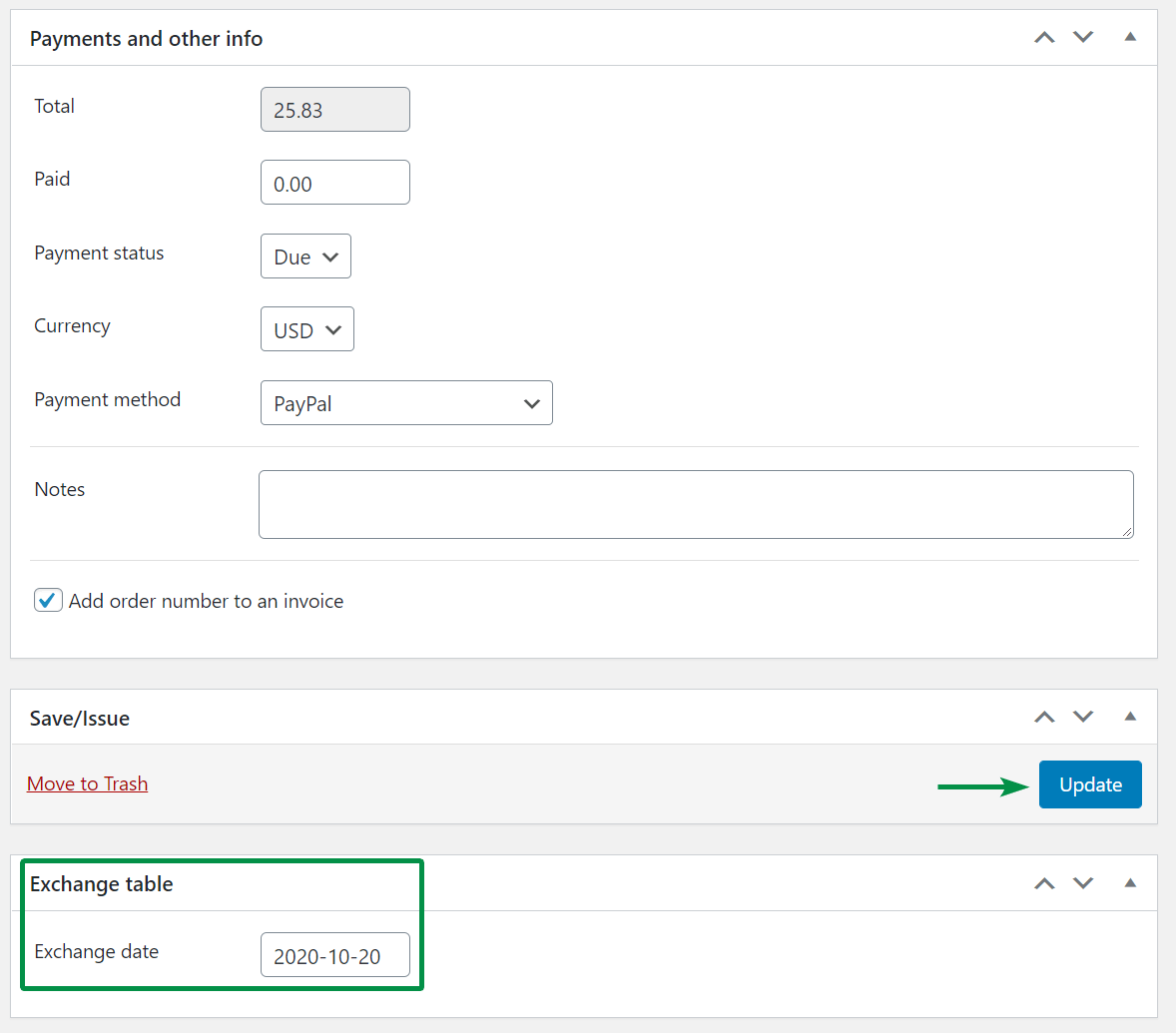
Where a different conversion date is needed, it can be set on the individual invoice, and the recalculated values appear on the document after saving.
Validation of the EU VAT number in the VIES database
An invoice for an EU business client has to carry the buyer’s VAT number, which means the store has to ask for it in the first place.

Checkout is the only realistic place to collect it. WP Desk telemetry from 19,803 WooCommerce stores, gathered in August 2026, shows 86.2% of orders placed as guests, so there is no account profile holding a VAT number from a previous purchase. A field that is not on the checkout form is a number you do not have.
The plugin adds the EU VAT number field and validates it against the European Commission’s VIES system as the order is placed. See also adding the EU VAT number field in WooCommerce and checking the number with one plugin.
What to do when validation fails
Three options, and they carry different risks:
- Allow the customer to place the order, with VAT kept on it
- Allow the order to be placed and remove VAT from it
- Block the order and display an error message

The first option is the safe default. VIES is a live query against each member state’s own database, and individual countries go offline independently of one another, so a number failing at three in the morning is as likely to be an outage as a fake. Keeping VAT on the order protects your tax position and keeps the sale, and a genuine business customer can be issued a correction. Removing VAT on an unvalidated number leaves the liability with you; blocking turns every outage into lost revenue.
Translations and WPML support
The plugin is available in English, French, Spanish, Italian, Polish and Dutch, and it supports WPML, so a multilingual store can issue documents in the language its customer ordered in.
Summary
EU VAT compliance in WooCommerce is four separate jobs, and core WooCommerce does none of them. You need the right country’s rate, which depends on the EUR 10,000 threshold you may or may not have crossed. You need the buyer’s VAT number, collected at checkout because most buyers never create an account. You need that number checked against VIES, with a sensible answer for the times the check fails. And you need the document itself to carry the reverse charge note, both VAT numbers, and a currency conversion table at the ECB rate from the day before the sale. Handling them in one plugin means those four decisions cannot contradict each other.
Frequently asked questions
Is WooCommerce EU VAT compliant out of the box?
No. WooCommerce stores tax rates and applies them, but it has no VAT number field, no VIES validation, no reverse charge handling and no invoices, so compliance comes from a plugin on top of it.
What is the EUR 10,000 threshold?
A single EU-wide annual limit on cross-border sales to consumers. Below it you may charge your own country’s rate; above it you charge the customer’s national rate and report through OSS. Since July 2021 it covers goods and digital services together.
Do I charge VAT to a company in another EU country?
Not when their VAT number validates. The transaction goes out at zero VAT with a reverse charge note, and the buyer settles the tax at home.
Do I charge VAT to a company in my own country?
Yes, at the normal rate. Reverse charge applies across borders, not to business customers in general.
What happens when a VAT number fails VIES validation?
You choose: keep VAT on the order, remove it anyway, or block the order. Keeping VAT is the safe default, because a failure is often a VIES outage rather than an invalid number.
Why does my invoice need a currency conversion table?
Because an invoice in a foreign currency with VAT specified generally has to show that VAT in your own currency as well. The plugin adds the table using the ECB rate from the day before the sale.
Which exchange rate does the plugin use?
The European Central Bank rate for the day preceding the sale, downloaded automatically. A different conversion date can be set manually on an individual invoice.
Is OSS support available in the free version?
No. OSS handling, VIES validation, reverse charge and the currency conversion table are PRO features. The free version issues invoices and handles sequential order numbers.
