



In the Invoices menu, select Settings → General tab. Then go to the General Settings section.
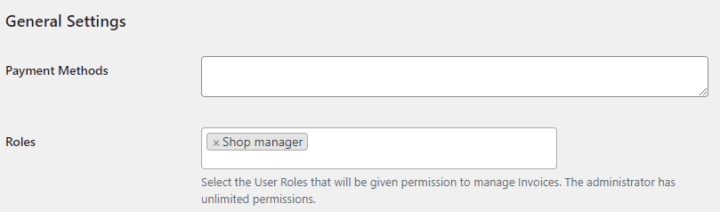
Payment Methods#
Use Payment Methods to define the basic payment methods available in the Payment method field when you manually issue or edit invoices, proformas, and corrections.
Enter one payment method per line. By default, the plugin adds:
- Bank transfer
- Cash
- Other
You can edit the default methods, add new ones, or remove methods that you do not use. Enter one payment method per line and click Save changes after editing the list.
When WooCommerce is active, payment methods from WooCommerce gateways are also available in the document payment section under the WooCommerce group. The methods added in this setting appear separately under the Basic group.
For invoices issued from WooCommerce orders, the plugin uses the payment method stored in the order. To configure WooCommerce payment gateways, go to WooCommerce → Settings → Payments.
Read more about setting payment methods for documents.
Roles#
Only users with roles Administrator and Shop manager can access and edit invoices by default. If you want to let other users edit invoices, add their roles in this field. The administrator always has unlimited permissions.
Select additional roles if users with those roles should be able to access and manage invoices. The selectable role list does not include Administrator, Customer, or Subscriber.
When you save the settings, the plugin assigns invoice permissions to the selected roles. If you remove a role from this field and save changes, the plugin removes the Flexible Invoices permissions from that role.
Click Save changes to apply the selected roles.