





Every month the same message arrives: can you send me the invoices for last month. What follows is usually half an hour of filtering, exporting and checking that nothing is missing, repeated twelve times a year by someone whose time is worth more than that.
What your accountant needs, and in what form
Three things, and the third is the one stores usually forget.
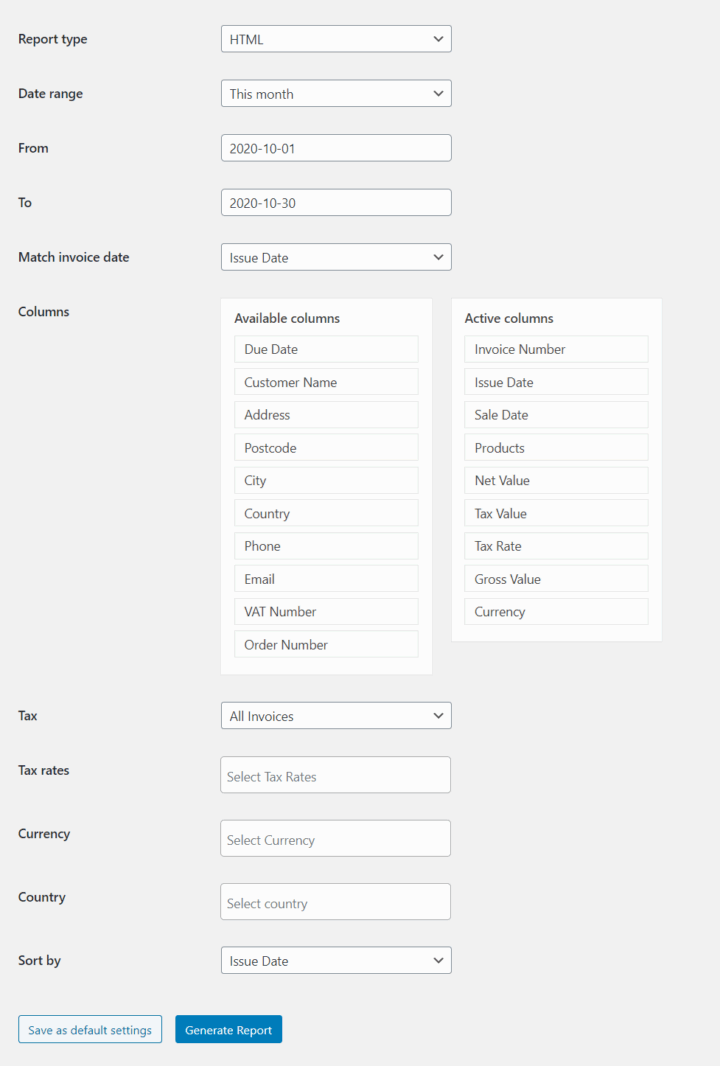
A list of every document issued in the period, with its number, date, net amount, VAT amount and gross total. This is the backbone of the bookkeeping entry, and it has to be complete rather than approximately complete, which is why a filtered view that quietly excludes cancelled orders causes more trouble than it saves.
A breakdown by VAT rate. Not one total, but the taxable base and the tax due for each rate separately, including the zero-rated and reverse charge lines. A store selling into several countries will have more rates in a month than it expects, and the accountant cannot reconstruct them from a gross figure.
And the documents themselves, as files, matching that list. A report without the PDFs means someone downloads them one at a time; PDFs without a report means someone types the figures in.
Why the default order export is not this
WooCommerce can export orders, and an order is not an invoice. The two drift apart as soon as anything unusual happens: an order with no invoice issued, an invoice issued against an order that was later edited, a correction document that has no order of its own at all.
The export also reports order totals rather than document totals, which is the same number most of the time and the wrong number exactly when it matters. Bookkeeping is done on documents, so that is what the report has to describe.
Making it a schedule rather than a task
The reason this stays manual in most stores is not difficulty. It is that it only takes half an hour, which is never enough to justify fixing and always enough to be late.
Set the period, set the recipient, set the day, and let it send itself. Monthly suits most stores; weekly suits anyone whose accountant works in batches; daily suits the few who reconcile as they go. The point is that nobody has to remember, and nobody has to do it on the second of January.
A monthly report is a settings screen, not a project. Advanced Reports for Flexible Invoices builds period reports from the documents rather than from the orders, with the VAT breakdown included, so the handover stops depending on anyone remembering.
Summary
An accountant asking for last month’s invoices needs three things, and most stores deliver two. A complete list of documents issued in the period, with number, date, net, VAT and gross for each. A breakdown by VAT rate rather than a single total, with zero-rated and reverse charge lines shown separately, because a multi-country store accumulates more rates in a month than it expects and those cannot be recovered from a gross figure. And the document files themselves, matching that list, since a report without PDFs means downloading one at a time and PDFs without a report means retyping the figures.
The built-in order export does not do this, because an order is not an invoice. The two separate whenever something unusual happens: an order with no invoice, an invoice against an order edited afterwards, a correction document with no order behind it. The export also reports order totals rather than document totals, which agree most of the time and differ exactly when it matters, and bookkeeping runs on documents.
What keeps this manual is not difficulty but size. Half an hour is never enough work to justify automating and always enough to be postponed. Putting the period, the recipient and the day into a schedule removes the dependency on anyone remembering, and removes the January version of the job entirely.
Frequently asked questions
These four decide how the handover is set up.
Can I send reports to more than one address?
Yes. A bookkeeper and an internal finance address can receive the same report, and it is usually worth doing so that nothing depends on one inbox.
What period should I use?
Monthly works for most stores. Weekly is better if your accountant processes in batches, because it spreads the questions out instead of concentrating them.
Does the report include correction invoices?
It should, and this is worth checking rather than assuming. A period report that lists only invoices overstates revenue by the value of every correction issued in that period.
What about documents issued in another currency?
They belong in the report at the values shown on the document. Conversion is an accounting decision, not a reporting one, so the report should not quietly do it for you.
