• Skip to primary navigation
  • Skip to main content
Flexible Invoices wordmark logo on a white background
WP Desk

WP Desk

WooCommerce Plugins

Flexible Coupons

Flexible Coupons

Gift cards and tickets

ShopMagic

ShopMagic

E-mail automations

Flexible Invoices

  • Pricing
  • Add-ons
  • Docs
  • Support
  • Blog
  • My Account
  • Ideas
Manual Invoice Corrections in WooCommerce

Published: 2024-06-03 / Updated: 2026-06-12 / Blog

Manual Invoice Corrections in WooCommerce

Przemek Rosa

Manual Invoice Corrections in WooCommerce – It’s Now Possible! πŸ‘‘
In this article, I’ll describe how to issue them using the WooCommerce Invoices PRO plugin version 4.6.
😌

In this article, you’ll find answers to:

  • How did we previously correct invoices? ↓
  • How to issue manual invoice corrections in WooCommerce? ↓
  • How to use automatic invoice corrections in WooCommerce? ↓
  • How to issue multiple correcting invoices for a single invoice? ↓
If you’d rather test the plugin on a demo instead of reading, go ahead! Click the demo link β†’

You can also buy the plugin and take advantage of the 30-day return period, so below I’m including the product card:

Flexible Invoices for WooCommerce PRO £59

Add to cart or View Details
WP Desk
Plugins used by 6,000+ shops
Last Updated: 2026-09-23
Works with WooCommerce 10.7 - 11.1

How did we previously correct invoices?

Until now, in the WooCommerce Invoices PRO plugin, correcting invoices was only possible during order returns. Based on the edited/returned values, the plugin would issue a correcting document.

The functionality was very simple but unfortunately insufficient. WooCommerce users couldn’t issue corrections for manually issued invoices (outside WooCommerce orders), or in situations where the invoice amount differed from the order values.

Read more about minor differences in WooCommerce invoices β†’

Since version 4.6, the functionality has been expanded and is now more flexible.

Let’s get to it!

Now, you can issue a correcting invoice in two ways.

Manual Invoice Corrections in WooCommerce

The first, and default method in the plugin, is manual invoice correction in WooCommerce. You can use it by going to the invoice list screen and clicking the correcting invoice button in the action column, right here:
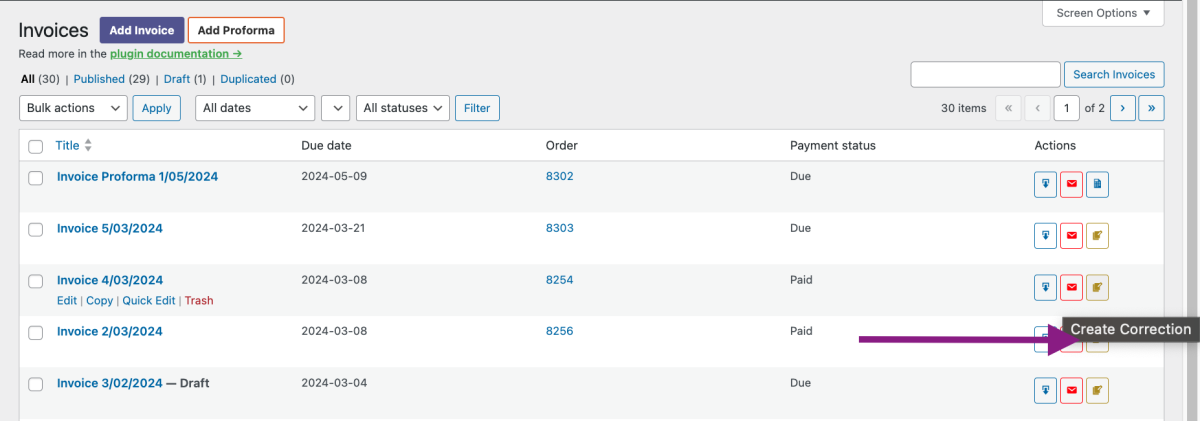
Correctiion Manual

After clicking, you’ll be redirected to the correcting invoice editor. To speed up your corrections, Piotrek Potrebka (the developer of WooCommerce Invoices PRO) programmed it so that the data from the invoice you’re correcting gets imported into the editor. In the right-hand column, you’ll also find a metabox with related documents. We hope this makes navigating through documents easier for you.

Remember to save the changes once you fill in the corrected values in the After correction table. Voila! The correction has been issued! πŸ€—

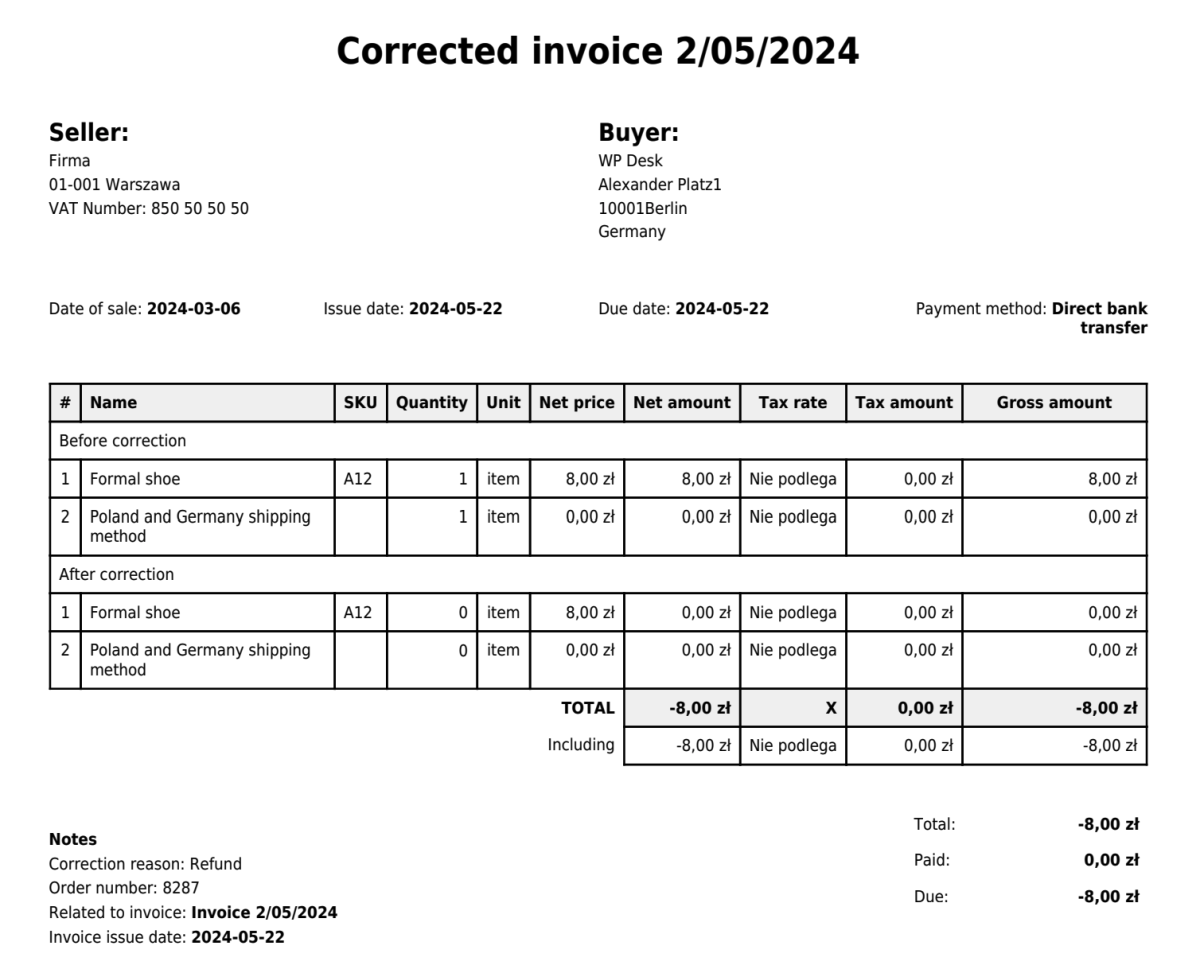
Correction template

That’s not all!

Automatic Invoice Corrections in WooCommerce

The second method works after enabling the option for automatic invoice corrections. During a return, you’ll be able to issue returns from the order level, just like before. Below are the steps for processing a return, after which you’ll issue a correcting invoice in the WooCommerce order. Here they are:

  1. Go to the order you want to return,
  2. Click Refund,
  3. Fill in the returned values,
  4. Finally, choose whether you want to process the return Manually or Automatically*.

*The automatic option is only possible if you use a payment gateway that supports automatic WooCommerce returns. Such gateways include Autopay WooCommerce.

And here is a GIF showing the return process ending with a correcting invoice:
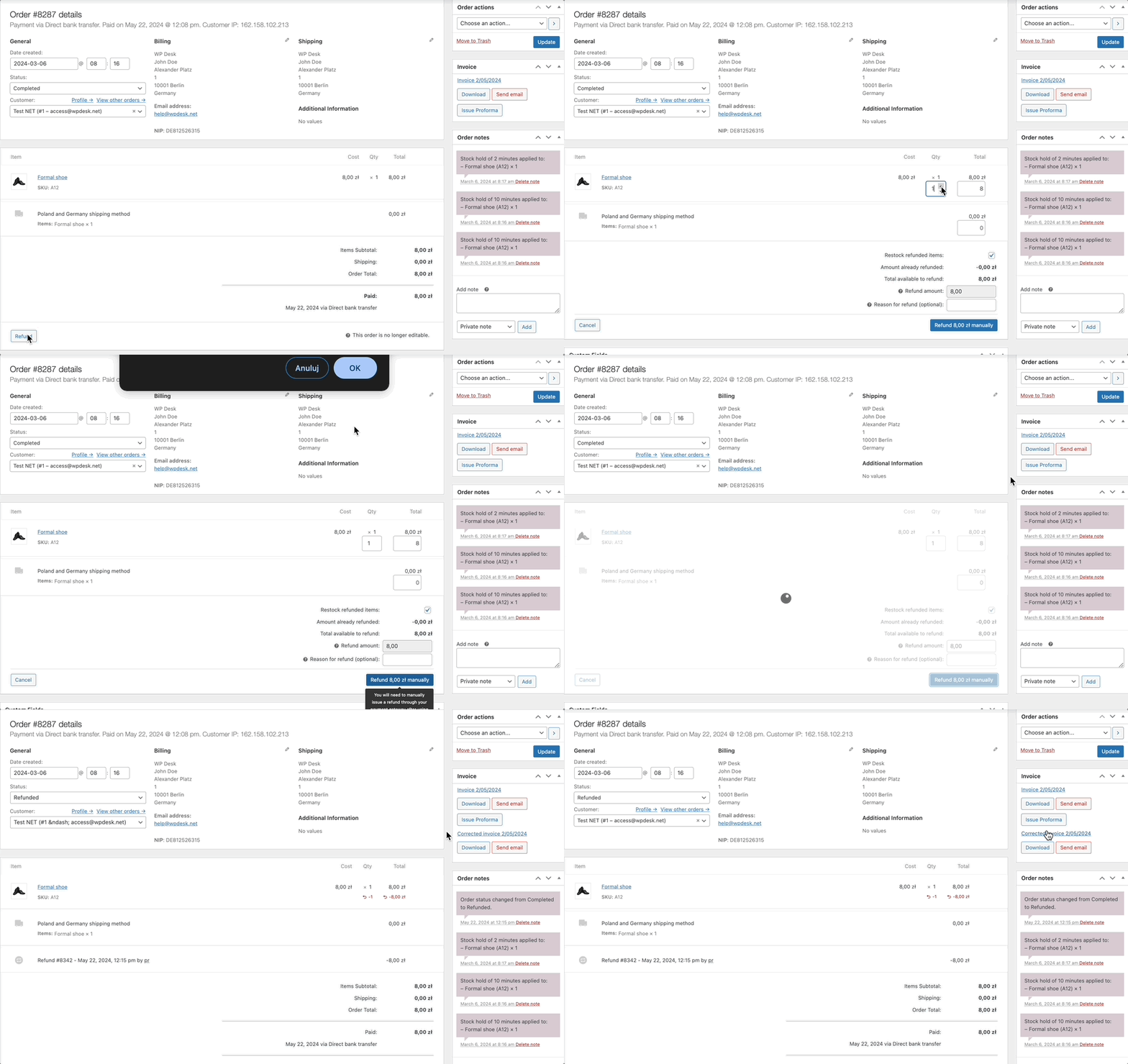
Automatic issuing of invoice correction

πŸ€“ Keep in mind that if you return the entire order, its status will change to Refunded. If any value in the order is greater than 0, the order status will not change.

But – again – that’s not all!

Issue Multiple Invoice Correction in WooCommerce

I saved something equally important for the end.
Since version 4.6, WooCommerce Invoices PRO allows you to issue multiple correcting invoices for a single invoice. I hope this makes it easier for you to manage the most popular invoicing plugin in Poland 😎

Flexible Invoices for WooCommerce PRO £59

Add to cart or View Details
WP Desk
Plugins used by 6,000+ shops
Last Updated: 2026-09-23
Works with WooCommerce 10.7 - 11.1

About Przemek Rosa

Hey, I am a Product Owner of Flexible Invoices :)
Your suggestions about the plugin strike right to my mailbox. Do you have any? Go ahead and email me!

  • Terms & Conditions
  • Privacy Policy
  • Support Policy
  • Refund Policy

© 2026 A WP Desk WP Desk Invoicing

Manage Consent
To provide the best experiences, we use technologies like cookies to store and/or access device information. Consenting to these technologies will allow us to process data such as browsing behavior or unique IDs on this site. Not consenting or withdrawing consent, may adversely affect certain features and functions.
Functional Always active
The technical storage or access is strictly necessary for the legitimate purpose of enabling the use of a specific service explicitly requested by the subscriber or user, or for the sole purpose of carrying out the transmission of a communication over an electronic communications network.
Preferences
The technical storage or access is necessary for the legitimate purpose of storing preferences that are not requested by the subscriber or user.
Statistics
The technical storage or access that is used exclusively for statistical purposes. The technical storage or access that is used exclusively for anonymous statistical purposes. Without a subpoena, voluntary compliance on the part of your Internet Service Provider, or additional records from a third party, information stored or retrieved for this purpose alone cannot usually be used to identify you.
Marketing
The technical storage or access is required to create user profiles to send advertising, or to track the user on a website or across several websites for similar marketing purposes.
  • Manage options
  • Manage services
  • Manage {vendor_count} vendors
  • Read more about these purposes
View preferences
  • {title}
  • {title}
  • {title}