




Selling to public institutions or larger B2B clients often means you must send compliant Peppol UBL e-invoices directly from your WooCommerce store. With the right plugin setup, you can automate this process and avoid manual XML files or rejected invoices.
In this guide you will learn how to:
- Understand what Peppol and UBL are and why they matter for WooCommerce
- Prepare your WooCommerce store for Peppol UBL e‑invoicing
- Configure Peppol UBL invoice data in the Flexible Invoices plugin
- Generate and download Peppol‑ready UBL XML invoices from WooCommerce orders
- Apply best practices and avoid the most common Peppol invoice issues
PEPPOL for Flexible Invoices PRO £29
Simple generation of invoices in the Peppol standard directly from WooCommerce. Download ready-to-use UBL (XML) files from the invoice edit screen, collect Peppol data during checkout, and meet B2B e-invoicing requirements without additional systems.
Add to cart or View DetailsWhat Is Peppol and UBL Invoicing?
What is Peppol?
Peppol (Pan‑European Public Procurement Online) is an international network for exchanging e‑invoices and other business documents between companies and public institutions. It replaces email PDFs with structured electronic documents sent via certified Access Points.
Using agreed formats and identifiers helps buyers automatically process invoices and reduces errors, manual work, and payment delays.
What is UBL?
UBL (Universal Business Language) is an XML standard for business documents such as invoices and credit notes. It defines a common structure for seller, buyer, tax, and line items so systems can read and validate invoices automatically.
In the Peppol network, UBL is usually the required XML format. In WooCommerce, Peppol UBL invoicing means generating UBL XML files that follow Peppol specifications.
Why Peppol UBL matters for WooCommerce
If you sell to government entities or larger companies in countries where Peppol is mandatory or recommended, you may need to send Peppol‑compliant e‑invoices. Without automation this often means extra tools or manual work for every order.
A Peppol UBL WooCommerce plugin lets you generate compliant XML invoices directly from orders, speeding up invoicing and helping you stay compliant.
Requirements and Basic Setup
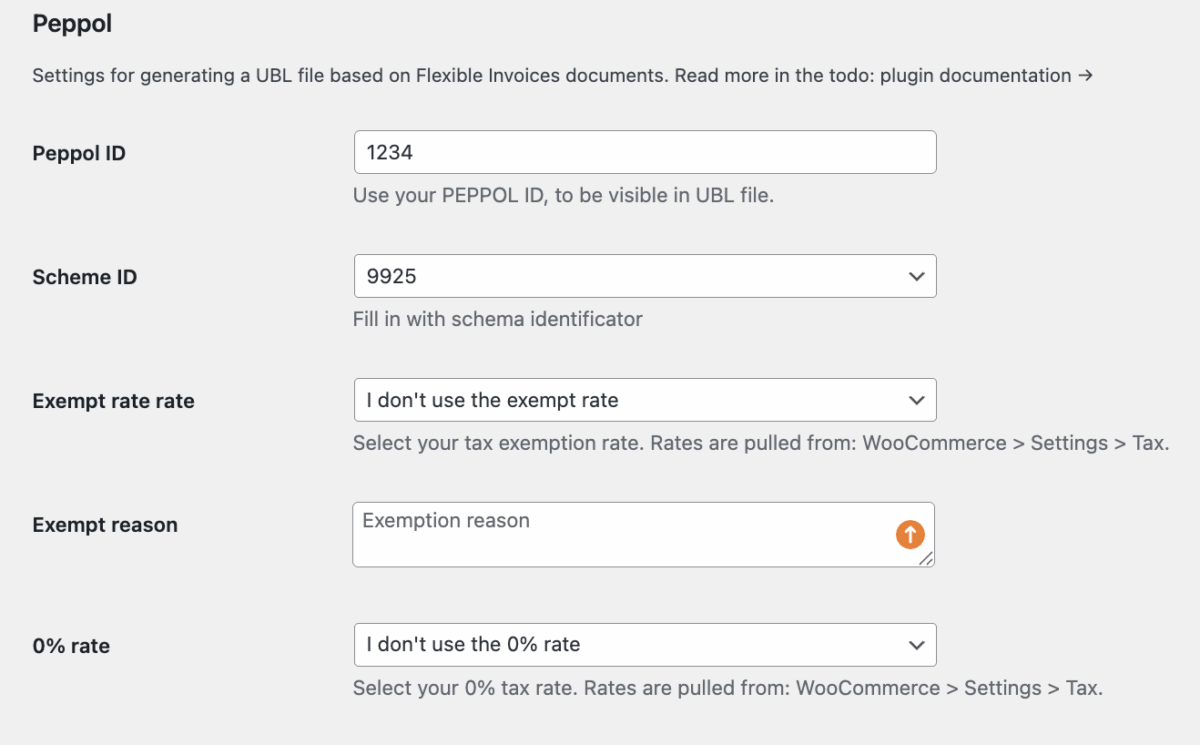
To start generating Peppol UBL invoices in WooCommerce, you need the right plugins and correct company data.
What you need
- WordPress with WooCommerce installed and configured
- Flexible Invoices for WooCommerce
- Peppol UBL add‑on for Flexible Invoices
- Correct company, tax, and Peppol identifiers
Quick installation steps
- Install and activate Flexible Invoices from Plugins → Add New.
- Configure basic invoice settings like company name, address, tax ID, and currency.
- Install and activate the Peppol UBL add‑on for Flexible Invoices.
Pro tip: First check that your standard PDF invoices show correct company and tax data, as this information is reused in UBL XML.
Configuring Peppol UBL in WooCommerce
After installation, configure seller and buyer data so your UBL XML invoices meet Peppol requirements.
Seller data
- Company legal name and registered address
- VAT or tax ID number
- Peppol Participant ID and Scheme ID
- Country code and other registrations required locally
Common mistake: A wrong Scheme ID for your Participant ID often causes invoice rejections, so always confirm it with your access point.
Buyer data and checkout fields
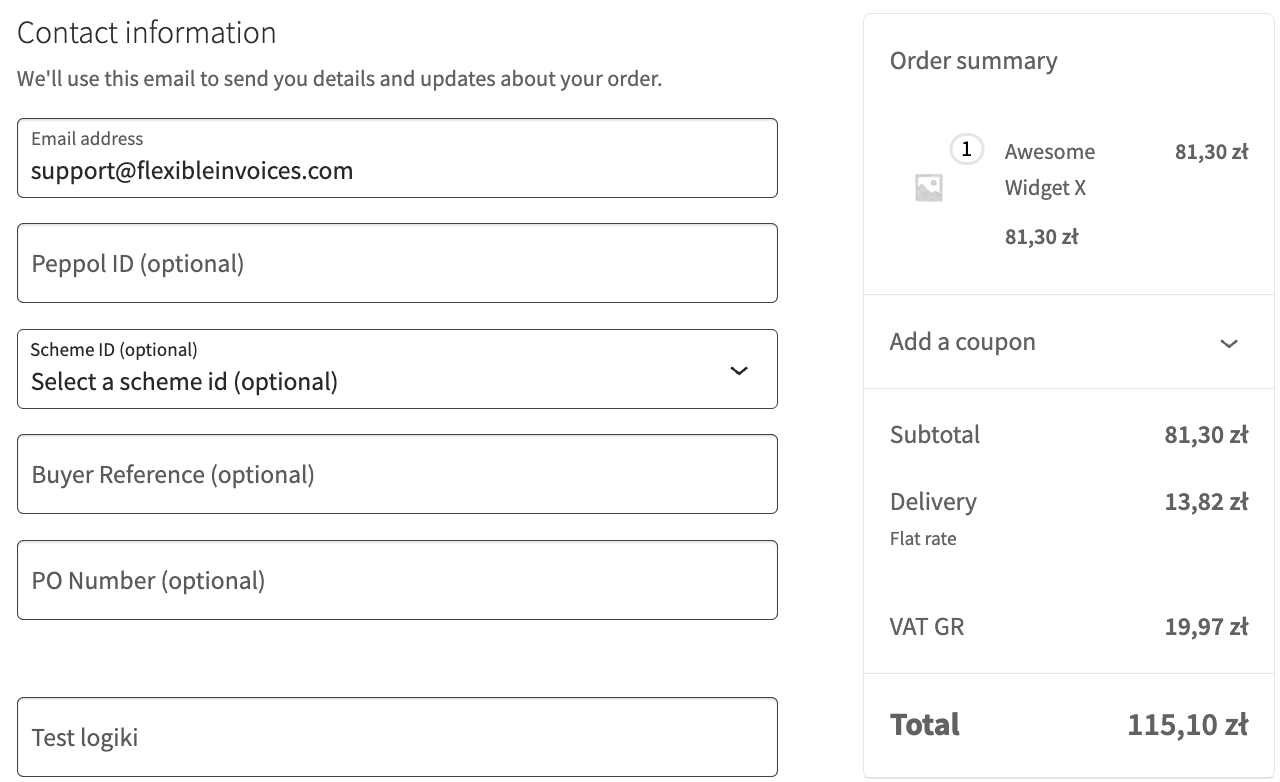
As you may now, Peppol invoices require extra buyer identifiers, so add custom fields at checkout for:
- Buyer Peppol ID and Scheme ID
- Purchase order or contract number
- Company name and full billing address
Then map these checkout fields to UBL elements in the plugin so the data is automatically added to the XML invoice.
Generating Peppol UBL XML Invoices
When configuration is ready, you can create Peppol UBL invoices from WooCommerce orders.
How to generate the XML
- Open a WooCommerce order that needs a Peppol UBL invoice.
- Create the invoice with Flexible Invoices, if not generated automatically.
- Check the Peppol or UBL section on the invoice screen.
- Verify that buyer identifiers and required fields are filled in.
- Click to generate or download the UBL XML file.
You can re‑download the XML later from the same invoice or order view if needed.
Best Practices and Next Steps
- Test the setup on several sample orders before using it with real clients.
- Make critical buyer fields required for customers who need Peppol invoices.
- Store buyer Peppol IDs and references as customer meta data for future orders.
Once your configuration is tested, you can reliably generate Peppol‑ready UBL invoices from WooCommerce and send them via your Peppol access point.
PEPPOL for Flexible Invoices PRO £29
Simple generation of invoices in the Peppol standard directly from WooCommerce. Download ready-to-use UBL (XML) files from the invoice edit screen, collect Peppol data during checkout, and meet B2B e-invoicing requirements without additional systems.
Add to cart or View Details